


Game Production
What Is MetaHuman? Photorealistic Characters in Unreal
MetaHuman by Epic Games creates photorealistic, animatable 3D humans for the Unreal Engine. We show how the tool works, what it can do, and what you need for it.
Tim Rantzau
Game Production
Nanite is the virtualized geometry system in Unreal Engine 5. We explain how it renders millions of polygons in real time, how to enable it, and where its limits are.
Unreal Engine 5 sets new standards for photorealistic graphics, and one system plays a key role: Nanite. Where developers once had to painstakingly build several levels of detail for a model by hand so a game would run smoothly, Nanite handles that work automatically. But what is behind it technically?
Nanite is the virtualized geometry system of Unreal Engine 5. It uses a new mesh format and a new rendering technology that makes it possible to display high-resolution 3D models and textures in large numbers in real time. The engine can calculate even billions of polygons quickly and at high quality. Together with the lighting system Lumen, Nanite forms the foundation on which the photorealistic graphics of Unreal Engine 5 are built.
When a source file such as an FBX file is imported, the mesh is first analyzed and divided into hierarchical clusters of triangles. During rendering, the engine displays each cluster at a different level of detail depending on the camera perspective. Data is streamed only when needed, and only visible details end up in memory. This keeps performance high, no matter how detailed the models are. Through various visualization views, developers can check at any time what the pipeline is doing.
To apply Nanite to a static mesh on import, tick "Build Nanite" in the Import Options. Existing assets can be switched over afterwards: for several models at once, select them in the Content Browser and enable Nanite via right-click in the context menu. For a single mesh, open the Static Mesh Editor and tick "Enable Nanite Support" under "Nanite Settings".
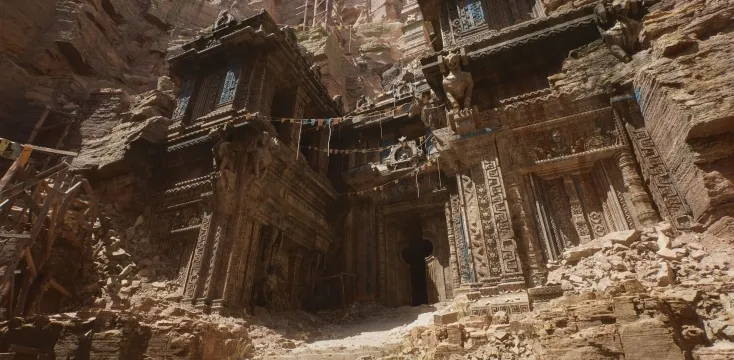
With Nanite, millions of pixel-accurate polygons can be displayed at the same time. Even the Unreal Engine 5 tech demo from 2020, "Lumen in the Land of Nanite", showed this impressively: each individual statue in the temple complex consisted of around 33 million polygons, and the engine rendered it in 4K at 60 frames per second with almost no loss of quality. Particularly practical is that source files such as ZBrush sculpts or photogrammetry scans can be imported directly and at full quality. The level of detail of the individual meshes is managed fully automatically by the engine.
In its first versions, Nanite had significant restrictions: fine structures such as grass, leaves, or hair looked porous, transparent materials were not supported, and animated or rigged meshes were difficult to implement with it. Epic Games has since addressed much of this. Newer Unreal Engine 5 versions brought, among other things, Nanite support for foliage and masked materials, as well as progress on animated meshes. Anyone using Nanite should keep an eye on the limits of the specific engine version, because the system is evolving quickly.
Nanite makes it possible to display extremely detailed worlds without the optimization effort that used to be standard, a real win for interactive applications, visualizations, and games. At Studio Merkas, we develop such real-time projects with the Unreal Engine. If you want to know how Nanite and Lumen can be used for your idea, get free advice.

Ready to get started?
We appreciate your interest in working with us. Whether you have an idea, a proposal, a question, or need assistance in another area, we’ll get back to you quickly—within 24 hours.